Planning My First Project with Jira and Agile Mindset
Table of Contents
Planning My First Project with Jira and Agile Mindset
Part 2 of my “First Complete Project” series. ← Part 1: Project Overview
Before writing a single line of code, I knew proper planning would make or break this project. As a solo developer, I wanted to practice professional workflows — so I set up Jira with Scrum Model.
Why Jira for a Solo Project?
Most developers jump straight into coding, but I wanted to learn project management alongside development. Jira let me:
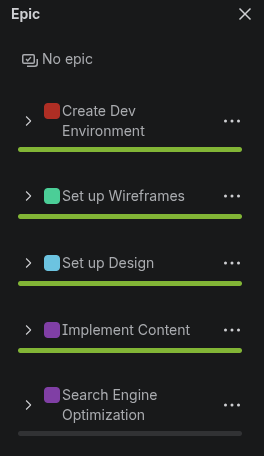
- Break the project into Epics (major phases like “Create Dev Environment”, “Set up Design”)
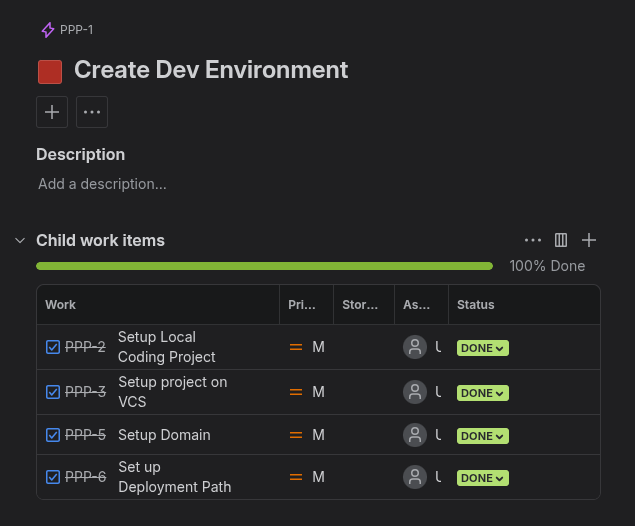
- Create detailed Tasks with subtasks
- Track progress visually in active Sprint
- Practice agile thinking even working alone
My Solo Scrum Setup
Product Owner <- Me (defines what to build)
Scrum Master <- Me (keeps process smooth)
Developer <- Me (build it)
Project Structure in Jira
Epic Structure
Task Structure
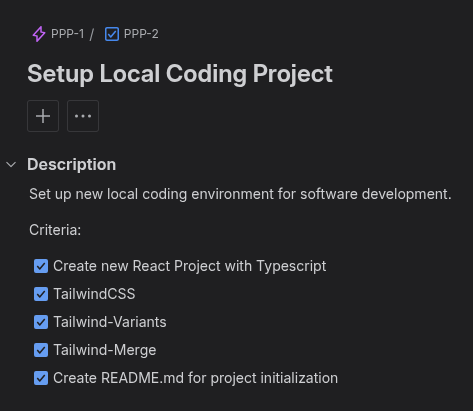
Subtask Structure
Key Decisions Made Early
- Labels for organization:
SoftwareEngineering,DevOps,Design,Marketing,SEO - Task descriptions with acceptance criteria
- Sprint planning 1-week cycles
What I Learned
- Structure prevents overwhelm — breaking the project into small tasks made it manageable
- Agile works solo — daily check-ins kept momentum high
This planning phase took 3 hours but saved me weeks of confusion.
Continue reading the “First Complete Project” series.